






BookDrive Capture 5.6 is updated with support new camera model
July 5, 2012 on 6:03 pm | In General | No CommentsWhat’s new in this version?
- Added camera model support for 5D Mark III and 1D X.
- Fixed Insert and crop bug.
BookDrive Capture can be downloaded here.
BookDrive Capture 5.5.8 is updated
June 11, 2012 on 10:11 am | In General | No CommentsWhat’s new in this version?
New features
- Remember the crop value.
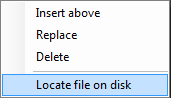
- Added “Locate file on disk” menu.
Fixed
- Custom size setting.
BookDrive Capture can be downloaded here.
BookDrive Editor Pro 5.0.5 with bug fixed is released.
June 6, 2012 on 9:40 am | In General | No CommentsWhat’s new in this version?
- Fixed Load Image Files for Windows XP in Chinese Language.
BookDrive Editor Pro 5.0.5 can be downloaded here.
BookDrive Editor Pro 5.0.4 is updated
June 6, 2012 on 9:36 am | In General | No CommentsWhat’s new in this version?
- Fixed Book name error.
BookDrive Editor Pro 5.0.4 can be downloaded here.
BookDrive Capture 5.5.7 with bug fixes now available.
June 6, 2012 on 9:31 am | In General | No CommentsWhat’s new in this version?
- Fixed custom re-size setting.
- Fixed re-size ratio.
BookDrive Capture can be downloaded here.
BookDrive Capture 5.5.6 is updated
June 6, 2012 on 9:22 am | In General | No CommentsWhat’s new in this version?
- Added Chinese language to export tool
- Fixed multi Tiff export file name in Capture.
- Fixed long file name.
BookDrive Capture can be downloaded here.
BookDrive Capture 5.5.5 is updated.
March 21, 2012 on 9:27 am | In General | No CommentsWhat’s new in this version?
- Added Chinese language to export tool
BookDrive Capture can be downloaded here.
BookDrive Editor Pro 5.0.3 just released
February 23, 2012 on 11:03 am | In General | No CommentsWhat’s new in this version?
- Enable Multi-language mode
- Fix bug export Raw to Tiff
- Fix page count UI
BookDrive Editor Pro 5.0.3 can be downloaded here.
BookDrive Capture 5.5.4 and BookDrive Editor Pro 5.0.2 are updated.
February 17, 2012 on 9:56 am | In General | No CommentsBookDrive Capture 5.5.4
What’s new in this version?
- Fix bug in single and multi- Tiff Export
- Support export raw image format
- Fixed libTif.dll error
BookDrive Capture(5.5.4) can be downloaded here.
BookDrive Editor Pro 5.0.2
What’s new in this version?
- Fix bug in single and multi- Tiff Export
- Support export raw image format
BookDrive Editor Pro(5.0.2) can be downloaded here.
BookDrive Capture 5.5.2 is updated.
February 7, 2012 on 5:51 pm | In General | No CommentsWhat’s new in this version?
- Fixed Save jpeg with metadata crash
- Delete and re-index crash
BookDrive Capture can be downloaded here.